
Provisioning lifecycle
Deep-dive into the environment state machine — all lifecycle states, valid transitions, terminal and non-operational states, and slot accounting.
Every environment in StoreFrame moves through a defined set of lifecycle states. The state machine is the single source of truth for what operations are permitted on an environment and whether a slot is being consumed.
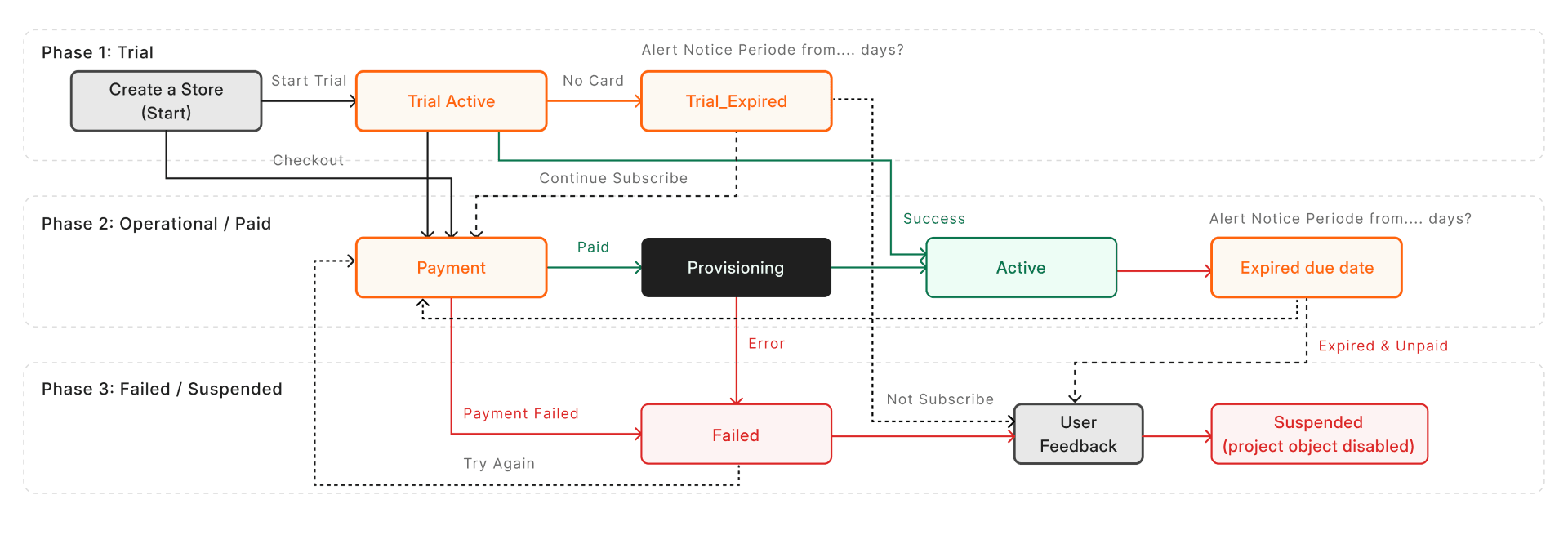
Lifecycle states
There are eleven states. They fall into four broad groups.
Transient states (not yet operational)
These states appear during environment setup. The environment is not usable while in any of them.
| State | Meaning |
|---|---|
draft | Environment record created; user has not yet paid or confirmed. Checkout may still be in progress. |
awaiting_payment | Stripe checkout session is open. The environment is waiting for payment confirmation. |
provisioning | Infrastructure is being created. A background job is building the server stack. |
failed | Provisioning job encountered an error. The environment may or may not have partial infrastructure. |
Active states (operational, slot-consuming)
An environment in any of these states occupies a billing slot.
| State | Meaning |
|---|---|
trial_active | Trial environment is live. Provisioned on StoreFrame's infrastructure, no subscription required. |
active | Paid environment is live and running normally. |
past_due | Subscription payment failed. Environment continues running during a grace period. |
Suspended / expired states
| State | Meaning |
|---|---|
suspended | Manually suspended or grace period exhausted after past_due. The status changes in the Hub; the VM and the store keep running until payment is resolved or the environment is destroyed. |
trial_expired | Trial period ended without conversion to a paid plan. No slot consumed. |
Terminal states
Once an environment reaches a terminal state it cannot transition further.
| State | Meaning |
|---|---|
destroyed | Infrastructure has been torn down. The environment record is retained for auditing. |
archived | Soft-deleted. The record is kept for historical reference; no infrastructure exists. |
Valid transitions
The table below lists every permitted state transition. Transitions not in this table are rejected.
| From | May transition to |
|---|---|
draft | awaiting_payment, provisioning, archived |
awaiting_payment | provisioning, archived |
provisioning | active, trial_active, failed |
active | past_due, suspended, destroyed, archived |
trial_active | active, trial_expired, suspended, destroyed |
trial_expired | active, destroyed, archived |
past_due | active, suspended, destroyed |
suspended | active, destroyed |
failed | provisioning, destroyed, archived |
destroyed | archived |
archived | — |
Non-operational states
The four non-operational states are draft, awaiting_payment, provisioning, and failed. When an environment is in any of these states, the Hub redirects to the provision status page rather than showing the environment panel. No Magento access, SSH, or console is available.
How transitions happen
You don't change an environment's state directly. It changes on its own when one of these happens:
- A job finishes. When a create, destroy, resize or stage job completes, the environment moves to its next state, or to
failedif the job did not succeed. - A billing event arrives. A failed subscription payment moves the environment to
past_due. If payment is not recovered within the grace period, it moves tosuspended. A checkout that is never completed expires after 24 hours. - A scheduled cleanup runs.
| Status | Cleaned up after |
|---|---|
draft | 30 minutes |
awaiting_payment | 24 hours (checkout expiry) |
failed | 30 minutes |
How customers interact with the state machine
Trial provision
A new trial environment starts at draft, skips awaiting_payment (no payment needed), and moves directly to provisioning via createTrial. On success the background job transitions it to trial_active.
draft → provisioning → trial_activeConvert trial to production
When a trial user subscribes, a new production environment is created and the trial data is synced into it. The trial environment transitions to destroyed independently. The new environment follows:
draft → awaiting_payment → provisioning → activeFresh project provision
A new paid project (no trial context) opens a Stripe checkout. Once payment is confirmed, provisioning begins:
draft → awaiting_payment → provisioning → activeStage (child environment)
A Stage is created under an existing active production environment. It follows the same flow as a fresh project but uses a stage slot:
draft → awaiting_payment → provisioning → activeResize
Resize is only available on active environments. The lifecycle status does not change — the environment stays active throughout. A background job applies the new server type and then broadcasts completion.
Destroy
An active environment (or a failed one) can be destroyed. The background job tears down infrastructure and transitions the environment to destroyed. A production environment cannot be destroyed if it still has child Stage environments.
active → destroyedSubscription payment failure
When Stripe reports a failed payment the environment moves to past_due. If payment is recovered (card updated, invoice paid) it returns to active. If the grace period expires, it moves to suspended. Reactivation from suspended requires payment recovery followed by a manual or automated reactivation flow.
active → past_due → active  (payment recovered)
active → past_due → suspended  (grace expired)
suspended → active  (reactivated)
Slot accounting
Each environment occupies one slot of its type while in a slot-consuming state.
Slot types
| Environment type | Slot type | Price |
|---|---|---|
trial | Trial | Free |
production | Project | €50/mo |
staging, develop, test | Stage | €10/mo |
Slot-consuming states
A slot is consumed whenever an environment is in provisioning, trial_active, active, or past_due. All other states — including failed, suspended, trial_expired, destroyed, and archived — do not consume a slot.
This means a failed provision releases the slot so a retry does not require a subscription change. A suspended environment also releases its slot; the slot is only re-occupied once the environment is reactivated and moves back to active.
Slot reconciliation
Slot counts are reconciled with Stripe at every state transition that enters or leaves a slot-consuming state. The Stripe subscription is updated to reflect the new slot count before the transition is committed.
When transitions fail
If an background job fails after the transition has been written to the database, the environment enters failed. From failed, two paths are available:
- Retry transitions back to
provisioningand a new background job runs - Destroy transitions to
destroyedand cleans up any partial infrastructure
See /troubleshooting/provisioning-failed for how to diagnose and resolve stuck or failed provisions.