
Invoices
StoreFrame invoices are issued on the 1st of each month and cover all Project and Stage slots in your organization.
StoreFrame issues one invoice per organization per month, covering all Project slots and Stage slots. Invoices are generated on the 1st of each calendar month and charged automatically to the payment method on file.
Calendar-month billing
All subscriptions align to the 1st of the month. When you first subscribe, you are charged immediately for the remaining days of the current month (prorated). Regular full-month billing then starts on the 1st of the following month.
Example — subscribing on January 13th:
January 13th: Subscribe
├── Immediate charge: €29.03 (Jan 13–31, 18 days of €50/month)
└── Project active

February 1st: Regular billing begins
└── €50.00 (full February)

March 1st: Regular billing continues
└── €50.00 (full March)
If you add a Stage environment mid-month, the same logic applies: an immediate prorated charge for the Stage slot, then the full €10 on the 1st.
What appears on an invoice
Each invoice lists all active slots for that billing period:
- Project slots one line per Project at €50/month
- Stage slots one line per Stage environment at €10/month
- One-time theme fees if you selected a premium theme, the one-time license fee is bundled into the first invoice that follows successful deployment
Cloud infrastructure costs (servers, storage, bandwidth) are not on your StoreFrame invoice — those go directly to your cloud provider.
Sample invoice structure:
Organization Subscription — February 2026
├── Project slot: My Store                €50.00
├── Stage slot: Staging (My Store)        €10.00
├── Stage slot: Develop (My Store)        €10.00
└── Total                                 €70.00
Viewing and downloading invoices
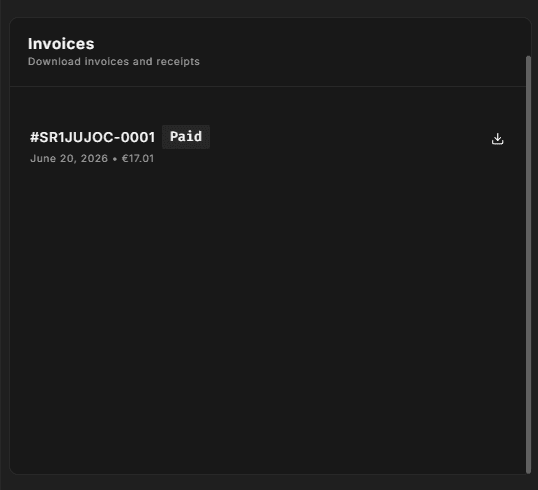
Go to Settings → Organization → Billing in Hub. The Invoices card lists all invoices issued to your organization with the date, total amount, and a PDF download link.
If no invoices have been issued yet (your trial has not converted), the card shows "No invoices received yet."
For full invoice management — changing billing name, updating billing address, or downloading receipts — click Manage in Stripe on the Payment Method card. The Stripe Customer Portal provides a complete history and accounting-ready PDFs.
See /docs/hub/settings/organization/billing for a detailed walkthrough of the billing page in Hub.
Payment methods
Your payment method is managed via the Stripe Customer Portal. To add or replace a card, go to Settings → Organization → Billing and click Manage in Stripe.
StoreFrame never stores your card details — all payment information is held by Stripe.
Failed payments
Stripe retries failed payments automatically over several days. If all retries fail, your subscription enters suspended status — typically around the 14th–15th of the month.
When suspended:
- Environments show as Suspended in the Hub until the outstanding invoice is paid, after which they return to Active
- Your servers keep running because you own the cloud infrastructure (BYOK), your Magento stores remain live for end customers as long as you keep paying your cloud provider
- Billing is paused no StoreFrame charges accrue while your account is suspended
- No automatic destruction suspended BYOK environments are never automatically deleted
All Projects in your organization are suspended together. StoreFrame issues one invoice per organization, so a single payment failure affects all your Projects.
Recovering a past-due account
To restore panel access:
- Go to Settings → Organization → Billing in Hub
- Click Manage in Stripe on the Payment Method card
- Update your payment method or resolve the payment failure in the Stripe portal
- Once payment succeeds, panel access is restored automatically for all Projects
- No data is lost — your servers were running throughout the suspension
If you have trouble accessing the billing settings while suspended, contact support through the dashboard.
Prorated billing reference
| Action | Billing |
|---|---|
| Subscribe mid-month | Immediate prorated charge (min €1), full month on the 1st |
| Add Stage mid-month | Immediate prorated charge (min €1), full month on the 1st |
| Remove Stage mid-month | No credit; the slot stays available until the end of the billing period and is not billed for the next period if unused when the period ends |
| Delete Project mid-month | No credit; the slot stays available until the end of the billing period and is not billed for the next period if unused when the period ends |
The €1 minimum applies to any prorated amount below €1 to avoid micro-transactions.
Related pages
- Slot model — what you are being billed for
- Trials — how your first invoice is generated after subscribing
- Billing settings in Hub — payment method, slot controls, and invoice list