
Deployments tab
Deployer PHP terminal and deployment command blocks for pushing code to a single environment.
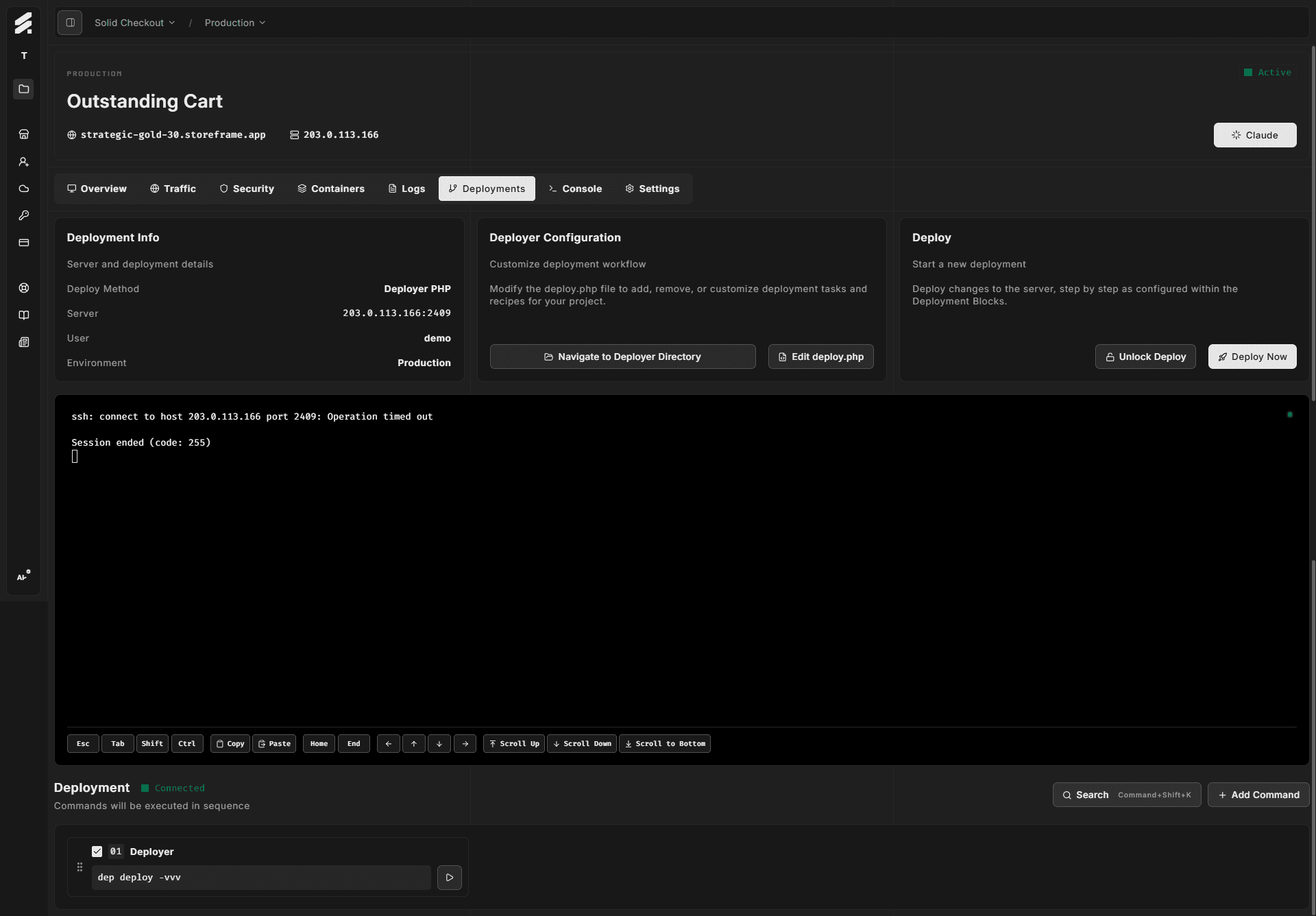
The Deployments tab is where you trigger and monitor code deployments. It uses Deployer PHP — a task runner that connects over SSH and executes your deployment workflow server-side. All output streams live into the embedded terminal.
Layout
The tab is split into three sections:
- Info cards — deployment configuration details, deployer directory access, and the deploy trigger
- Deployment terminal — an embedded terminal (black background) that shows live output from the running deploy process
- Deployment command blocks — a configurable list of commands that run in sequence when you click Deploy Now
Info cards
Deployment Info shows the target server IP and port, the SSH user, and the environment type (production, staging, develop, or test).
Deployer Configuration gives you quick access to the deployer directory on the server. Two buttons open the deployer path in the terminal:
- Navigate to Deployer Directory
cds the terminal session to the deployer folder - Edit deploy.php opens
deploy.phpinnanoso you can customize the deployment recipe without leaving the Hub
Deploy triggers the configured deployment sequence. Two buttons:
- Deploy Now executes each enabled command in the Deployment command blocks in sequence
- Unlock Deploy runs
dep deploy:unlockto clear a stale lock file left by a failed or interrupted deploy
Running a deploy
- Confirm the terminal shows a connection indicator. If it shows disconnected, wait a moment for the WebSocket to reconnect.
- Click Deploy Now. Each command in the deployment sequence runs in order inside the terminal.
- Watch the output stream for errors. Common failure points are composer install,
setup:upgrade, and static content deploy. - If a previous deploy left a lock file, Deployer will refuse to start. Click Unlock Deploy first, then retry.
Deployment command blocks
The command blocks panel below the terminal lists every command configured for the deployment category. You can:
- Toggle individual commands on or off to include or exclude them from the next deploy sequence
- Reorder commands by dragging
- Add custom commands via the + button
- Edit or remove existing commands from the context menu on each block
Commands run in the order shown, top to bottom, when you click Deploy Now.
Using the Console tab for ad-hoc commands
The Deployments tab runs commands through the dedicated deployments terminal session. For anything outside the deployment workflow — cache flush, reindex, Magento CLI commands — use the Console tab instead, which gives you a full interactive shell.