
OpenSearch
OpenSearch powers Magento's product, category, and CMS page search for all environments on Magento 2.4.6 and above.
Every StoreFrame environment running Magento 2.4.6 or newer uses OpenSearch as the search engine. OpenSearch replaced Elasticsearch as Magento's default search backend starting with Magento 2.4.6. Magento 2.4.5 and earlier use Elasticsearch 7.x instead — those environments run an elasticsearch container, not opensearch.
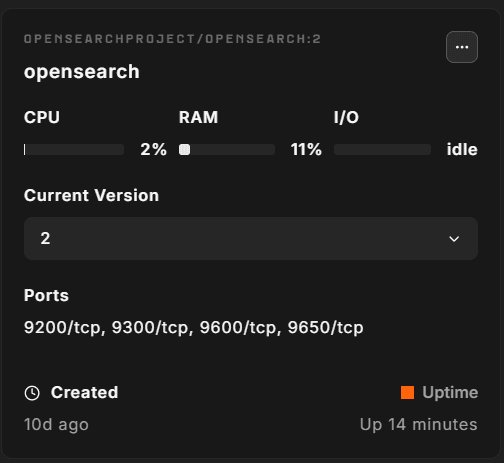
Version
OpenSearch version is pinned per Magento release:
| Magento release | OpenSearch version |
|---|---|
| 2.4.8, 2.4.9 | 3.7.0 |
| 2.4.6, 2.4.7 | 2.19.5 |
| 2.4.5 (fallback) | 2 |
| 2.4.4 (fallback) | 1 |
| Mage-OS 3.x | 3 |
Magento releases pin an exact OpenSearch version, for example opensearchproject/opensearch:3.7.0. Mage-OS and the fallback rows use a major version tag (3, 2, or 1); the exact minor version is resolved by Docker at pull time.
You can pin a specific version in the environment file (.env):
CONTAINERS__OPENSEARCH_VERSION='3.7.0'JVM heap
OpenSearch's Java heap is controlled by the OPENSEARCH_JAVA_OPTS environment variable. The default is -Xms1g -Xmx1g — 1 GB minimum and maximum heap. This is a fixed default, not auto-computed from VM RAM.
To increase the heap on a larger VM, set:
OPENSEARCH__OPENSEARCH_MEMORY='-Xms2g -Xmx2g'Keep minimum (-Xms) and maximum (-Xmx) equal to avoid heap resizing overhead. The OpenSearch JVM recommendation is to set both to the same value. As a rule of thumb on a VM shared with PHP, MariaDB, and Redis, allocate no more than 25–30% of total RAM to OpenSearch — the OS and JVM itself need headroom outside the heap.
Single-node configuration
StoreFrame environments run OpenSearch in single-node mode (discovery.type=single-node). After startup, the role applies an index template that sets number_of_shards=1 and number_of_replicas=0 on all indexes. This prevents the cluster from entering yellow health status due to unassigned replica shards, which would otherwise block Magento indexing.
OpenSearch is only reachable from inside your environment's private Docker network.
Plugins installed
Two plugins are installed at provision time:
| Plugin | Purpose |
|---|---|
analysis-phonetic | Enables phonetic token filters (Soundex, Metaphone) for fuzzy product name matching |
analysis-icu | Unicode-aware text analysis for multilingual catalogs |
Plugin installation happens inside the running container after startup and triggers a container restart if any plugin was newly added.
Storage
OpenSearch data is stored in a named Docker volume (opensearch_data) at /usr/share/opensearch/data. The volume persists across container restarts. Data is not backed up separately — search indexes are fully regenerable from the MariaDB database.
Magento indexes
Magento maintains the following search-related indexes in OpenSearch:
| Index | Reindex command |
|---|---|
| Product catalog search | bin/magento indexer:reindex catalogsearch_fulltext |
| Category products | bin/magento indexer:reindex catalog_category_product |
A full reindex is required after search configuration changes, after OpenSearch restarts, or after importing large product datasets. The reindex time scales with catalog size — for large catalogs (100k+ products), expect several minutes.
# From the VM host — run as the project user
php bin/magento indexer:reindex catalogsearch_fulltext

# Check indexer status
php bin/magento indexer:status
How to access
# Check cluster health
docker exec opensearch curl -s http://localhost:9200/_cluster/health | python3 -m json.tool

# List all indexes
docker exec opensearch curl -s http://localhost:9200/_cat/indices?v

# Check installed plugins
docker exec opensearch bin/opensearch-plugin list

# View JVM heap usage
docker exec opensearch curl -s http://localhost:9200/_nodes/stats/jvm | python3 -m json.tool
Operational gotchas
Yellow cluster health blocks indexing. On a freshly provisioned environment the cluster can enter yellow status if the single-node index template was not applied before Magento created its indexes. Fix: reset replicas on existing indexes and re-run provisioning.
docker exec opensearch curl -s -X PUT "http://localhost:9200/*/_settings" \
  -H 'Content-Type: application/json' \
  -d '{"index":{"number_of_replicas":0}}'
Query Insights plugin field limit errors. OpenSearch 2.x ships with a Query Insights plugin that can generate field-limit errors on large Magento catalogs. The provision role disables it via a cluster settings call. If you see errors like Limit of total fields [1000] in index [...] has been exceeded, the plugin may have been re-enabled. Disable it:
docker exec opensearch curl -s -X PUT "http://localhost:9200/_cluster/settings" \
  -H 'Content-Type: application/json' \
  -d '{"persistent":{"plugins.query_insights.enabled":false}}'
OOM kills. OpenSearch's JVM heap is fixed at provision time. A full reindex on a large catalog while the heap is set to 1 GB can cause an OOM kill. Increase OPENSEARCH__OPENSEARCH_MEMORY in .env (for example -Xms2g -Xmx2g) and choose ⋯ → Install on the OpenSearch container before running bulk reindexing operations.
Slow first-request after restart. OpenSearch takes 15–30 seconds to start after a container restart. Magento search requests during this window return HTTP 503. The container uses restart_policy: unless-stopped so it recovers automatically; the short outage is expected.