
Redis
Redis provides Magento's cache backend, page cache, and session storage in every StoreFrame environment.
Every StoreFrame environment runs Redis as a single Alpine-based container. Magento stores three different kinds of data in it, each in its own logical database:
- Application cache (db 0) — Magento's cache backend: configuration, layout, EAV, translations, and other cache types.
- Page cache (db 1) — the full-page cache (FPC).
- Sessions (db 2) — customer and admin session storage.
The default is one container holding all three databases. When an environment is provisioned with three replicas (REDIS__REDIS_REPLICAS='3'), Magento routes each role to its own dedicated container instead (redis, redis-1, redis-2).
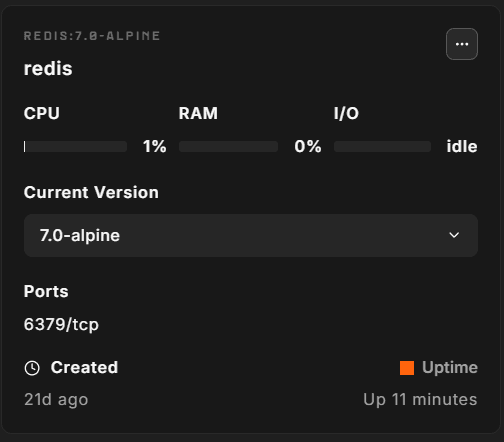
Version
Redis version is pinned per Magento release:
| Magento release | Redis version |
|---|---|
| 2.4.9, 2.4.8, 2.4.7, 2.4.6, 2.4.5 | 7.2 |
| 2.4.4 | 6.2 |
| 2.4.3 | 6.0 |
| 2.3.x | 5.0–6.0 |
| Mage-OS 3.x | 7.2 |
You can pin a specific version in the environment file (.env):
CONTAINERS__REDIS_VERSION='7.2'Memory cap
The role calculates a per-instance memory cap at provision time:
redis_maxmemory = clamp(RAM × 2%, 256 MB, 8 GB)The eviction policy is allkeys-lru. When Redis reaches its memory cap it evicts the least-recently-used key from the entire keyspace. Cache and FPC keys are regenerated automatically; in the default single-container setup this policy is required, because cache keys carry no expiry and would otherwise never be evicted. In the 3-replica setup, the dedicated session container uses volatile-lru instead: every session key carries a TTL, so only expiring keys are evicted there.
The redis_maxmemory and redis_maxmemory_policy values are computed by the role formula and are intentionally not exposed in .env as editable fields. You can still override them by adding the REDIS__ keys manually:
REDIS__REDIS_MAXMEMORY='1024mb'Database assignment
| DB index | Magento use | Container (3-replica mode) |
|---|---|---|
| 0 | Cache backend | redis |
| 1 | Full-page cache | redis (or redis-1) |
| 2 | Session storage | redis (or redis-2) |
Session database (db 2) is configured with a session max-concurrency of up to 30, scaled with the PHP worker count, which limits the number of concurrent PHP processes that can wait on the same session lock. This prevents session-locking pile-ups during traffic spikes.
Scaling to multiple replicas
The default is one Redis container. To separate cache, FPC, and sessions into dedicated containers, set:
REDIS__REDIS_REPLICAS='3'Provisioning creates redis, redis-1, and redis-2 and reconfigures Magento to route each concern to its own container. The containers share the same image and memory cap formula. The cache containers keep allkeys-lru; the session container (redis-2) uses volatile-lru, because every session key carries a TTL.
Network access
Redis listens on port 6379 inside the Docker network. The port is not exposed to the host or internet. PHP and other containers reach Redis by container name (redis, redis-1, redis-2).
The host wrapper script is available on PATH:
# Connect to Redis CLI (single-instance setup)
redis-cli

# Or directly via docker exec
docker exec -i redis redis-cli

# Ping
redis-cli ping

# Check memory usage
redis-cli info memory | grep used_memory_human

# Count keys in each database
redis-cli -n 0 dbsize   # cache
redis-cli -n 1 dbsize   # FPC
redis-cli -n 2 dbsize   # sessions
Magento knobs
Magento's Redis connection is configured in app/etc/env.php. Do not edit the Redis settings in it directly, because the platform rewrites them. Change .env instead and choose ⋯ → Install on the Redis container.
To flush all Magento caches (including Redis):
php bin/magento cache:flushTo flush only the Redis cache backend without Magento's cache type wrappers:
redis-cli -n 0 flushdbTo flush FPC specifically:
redis-cli -n 1 flushdbOperational gotchas
Memory pressure. The formula has a 256 MB minimum, so every VM up to about 12 GB RAM gets a 256 MB cap. If you see OOM command not allowed in Magento logs, the cap has been reached and keys are being evicted faster than they are regenerated. Increase REDIS__REDIS_MAXMEMORY in .env and choose ⋯ → Install on the Redis container (outside busy hours, because it clears sessions), or provision a larger VM.
Session locking. Magento holds a Redis lock for the duration of each PHP request that reads or writes session data. Long-running requests (import, checkout with slow payment gateways) can cause subsequent requests from the same customer to queue behind the lock. Lowering the session max-concurrency makes this worse, not better.
Container restart drops keyspace. The Redis container runs with /data as a tmpfs mount — persistence (AOF/RDB) is disabled by design. A container restart clears all Redis data. Magento will rebuild the cache on the next request, but sessions are lost, which logs all customers out. Avoid restarting the Redis container during business hours.
redis-cli vs redis. The host wrapper redis-cli routes to the first container (redis). On a 3-replica setup, connect to redis-1 or redis-2 with docker exec -i redis-1 redis-cli directly.