
Varnish
Varnish provides full-page caching for Magento storefronts, with ESI support for customer-specific blocks.
Varnish is a full-page cache (FPC) that sits in front of the PHP application and serves cached HTML responses without hitting FrankenPHP or nginx for every request. On a warm cache, a Magento product page that takes 300 ms to generate is served in under 5 ms. Varnish is active in production environments; developer environments skip it and route traffic directly to the PHP backend.
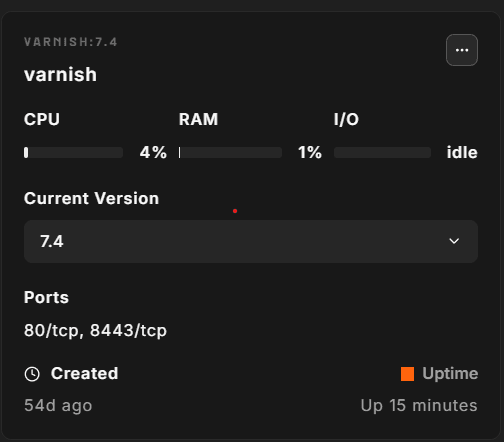
Version
Varnish version is pinned per Magento release:
| Magento release | Varnish version |
|---|---|
| 2.4.9 | 7.7 |
| 2.4.7, 2.4.8 | 7.4 |
| 2.4.4, 2.4.5, 2.4.6 | 7.1 |
| 2.4.3 | 6.5 |
| 2.3.x | 6.3–6.5 |
| Mage-OS 3.x | 7.7 |
You can pin a specific version in the environment file (.env):
CONTAINERS__VARNISH_VERSION='7.7'Configuration defaults
The following settings are written to .env at provision time and control the Varnish daemon:
| Setting | Default | Description |
|---|---|---|
VARNISH__VARNISH_MEMORY | 1024M | Storage backend size (malloc) |
VARNISH__VARNISH_LISTEN_PORT | 6081 | Port Varnish listens on inside the Docker network |
VARNISH__VARNISH_BACKEND_HOST | nginx | Upstream backend (nginx, or php for FrankenPHP) |
VARNISH__VARNISH_BACKEND_PORT | 8080 | Backend port |
The in-memory storage backend (malloc) means Varnish cache does not persist across container restarts. A restart cold-starts the cache.
Default TTL is 120 seconds (-t 120), set via the daemon startup flags. This is the TTL for objects that do not carry their own Cache-Control or s-maxage headers. Pages that Magento marks cacheable carry their own lifetime, which takes precedence. Static and media files bypass Varnish and are served by nginx directly, and pages with customer-specific context use ESI to strip out the uncacheable sections.
VCL generation
Varnish uses StoreFrame's own VCL template, not the output of bin/magento varnish:vcl:generate. At provision time the platform renders it for your environment, tells Magento that Varnish is the full-page cache, and points Magento at the Varnish container for cache invalidation. The template works with Magento 2.4.x and Mage-OS, because it relies only on Magento's core cache headers.
What the StoreFrame VCL does:
- Magento-compatible caching rules — the same cache key as Magento's own VCL (URL, host, protocol, the
X-Magento-Varycookie, and GraphQL cache headers), only200and404responses are cached, andSet-Cookieis removed from cached pages. Marketing and tracking parameters (utm_*,gclid,fbclid, and similar) are stripped so ad landings share one cached page. - Soft purge with xkey — Magento's cache tags are indexed, so a purge marks only the affected pages as expired instead of dropping them. The next visitor gets the stale copy while Varnish fetches a fresh one in the background.
- Grace — stale content is served for up to 1 day after expiry or a soft purge while a fresh copy is fetched in the background. If that refresh fails, Varnish keeps serving the existing copy.
- Purge limited to the private network — PURGE requests are only accepted from the environment's private container network. PURGE from the internet is blocked.
- Health check — Varnish polls
/health_check.phpand re-resolves the backend container automatically when it is recreated.
Every new VCL is compile-checked inside the running Varnish before it replaces the current one, and is then loaded in place without restarting Varnish, so the cache stays warm through an update.
You can replace the generated VCL with your own. Create it at:
/var/www/<subdomain>.<domain>/.docker/etc/varnish/custom.vclThen open the environment's Containers tab and choose ⋯ → Install on the Varnish container. The platform uses custom.vcl in place of the StoreFrame VCL from then on, and later platform runs leave it alone. To go back to the StoreFrame VCL, contact support.
ESI
Magento uses Edge Side Includes (ESI) to handle customer-specific blocks — cart item count, customer account header, recently viewed products, and wish list — that cannot be cached globally. The Varnish daemon is started with three ESI feature flags:
-p feature=+esi_ignore_https
-p feature=+esi_ignore_other_elements
-p feature=+esi_disable_xml_check
These flags allow ESI to work with HTTPS backends and with Magento's HTML output, which is not strict XML. Without them, ESI blocks are stripped silently.
When a logged-in customer loads a product page, Varnish serves the cached page skeleton and makes a sub-request to nginx to fetch the cart/account ESI fragment for that specific session. The skeleton is shared; only the fragment varies per customer.
Cache invalidation
Magento invalidates Varnish cache by sending HTTP PURGE requests to the Varnish container. The purge ACL in the VCL only accepts requests from the environment's private container network. The Magento FPC cache type must be set to Varnish:
# Confirm Varnish is the active FPC backend
php bin/magento config:show system/full_page_cache/caching_application
# Returns: 2 (Varnish), 1 (built-in)

# Flush all Varnish cache via Magento
php bin/magento cache:flush full_page
You can also purge everything directly via the Varnish admin port:
# Via the varnishadm wrapper script
varnishadm "ban req.url ~ ."

# Or directly
docker exec -i varnish varnishadm "ban req.url ~ ."
How to access
# View real-time cache statistics
varnishstat

# View access log (Apache Combined Log format)
varnishncsa

# Check backend health
docker exec -i varnish varnishadm backend.list

# Check VCL in use
docker exec -i varnish varnishadm vcl.list

# Purge a specific URL
docker exec -i varnish varnishadm "ban req.url == /some-path"
Operational gotchas
Cache not warming after restart. Varnish uses malloc storage — every container restart empties the cache. The first requests after a restart hit the PHP backend. High-traffic stores should warm the cache after a restart by crawling key URLs with a tool like wget --spider or using Magento's built-in warmer integrations.
Custom VCL. A custom.vcl (see above) takes precedence over the StoreFrame VCL and is never overwritten by the platform. You are responsible for keeping it compatible with your Magento version, including the purge rules Magento needs to clear the cache.
Developer mode bypasses Varnish. In developer environments, Varnish is not provisioned. OpenResty routes traffic directly to the PHP backend. This matches Magento's developer mode, which disables FPC entirely.
Varnish header exposure. The VCL strips the X-Varnish and Via headers from responses. This is intentional — these headers reveal infrastructure details that are not useful to store visitors.