Magento Never Finished Fixing Its JavaScript. We Rebuilt It With AI, in Rust.


The Magento admin is slow to work in, and Magento never finished fixing it. How we picked that old idea up with AI agents in 2026, ran 58 experiments, and rebuilt it in Rust.
Ask anyone who runs a Magento shop what they dislike most, and sooner or later they get to the admin. Open a product: wait. Save it: wait. Go back to the list: wait again, while the whole screen builds itself from scratch. Merchants and their teams spend their working day in there, hundreds of clicks a day, and every one of them reminds you that Magento is slow.
Open the network tab on one of those screens and you see why. The browser asks for a script, reads it, learns it needs three more, asks for those, and so on. One product edit screen can take close to five hundred files that way, before Knockout builds hundreds of interface parts from them. And unlike the storefront, none of it can be cached in front: every admin page belongs to one person and one session.
The storefront has an answer by now. Hyva showed that a rebuilt theme can make it fast, and plenty of shops took that road. The admin never got one. Magento tried to fix its script loading more than once and never finished: there is the built-in bundling that most people switch off again, an "advanced bundling" route that needs a hand-written build file per shop, and Baler, an official experiment that never left alpha. None of them even touch the admin. RequireJS itself has barely changed in years.
This is the story of picking that old, half-finished idea up again in 2026 and rebuilding it with AI agents, with the admin as the first target. Not with a clever trick, but as a research project: 58 rounds of guessing, measuring and mostly throwing things away. What survived is a small module with a program written in Rust that makes the admin noticeably faster, and the Luma storefront too. What I learned on the way was mostly about Magento itself.
I did not start with code
The usual way to fix a slow page is to pick a tool and install it. I wanted to understand the problem first, so I gave it to AI coding agents and gave myself a different job. The agents read Magento's code, wrote the tests, drove real browsers through hundreds of page loads and read the traces. My job was to ask the questions, set the bar, and say no.
The first question was the simplest one: where does the time actually go? Everyone assumes the server. The answer was the browser. On a heavy product edit screen, the server had finished in under a second. The page was usable after two and a half. The rest was the browser fetching hundreds of small files one after another, and then building hundreds of interface parts from them.
That one answer shaped everything after it. If the browser is the slow part, no faster PHP, no bigger server and no cache in front will fix it. The work has to happen in how the page's code reaches the browser and what the browser does with it.
Magento's oldest trick: slow once, fast after
Before writing anything, it helped to see the pattern Magento already uses everywhere. Compiling the code generates thousands of classes once, so no request has to work them out. Deploying the static files prepares every theme and language once, so no visitor waits for it. Varnish is slow on the first visit to a page and fast on every visit after. The browser keeps what it has downloaded. Magento is built on one simple idea: do the expensive work once, ahead of time, and serve the result.
JavaScript loading is the one place where that idea was never carried through. Every page still works out, in the visitor's browser, which files it needs, one request at a time, every time it starts. So the goal became clear: give the page's code the same treatment the PHP code and the static files already get. Work it out once, at deploy, and let the browser cache do the rest. The first visit may cost a little. Every visit after should be fast.
| Done once, ahead of time | What every request gets | |
|---|---|---|
| Code compile | Thousands of classes generated at deploy | Ready classes, nothing worked out at request time |
| Static file deploy | Every theme and language prepared at deploy | Ready styles and scripts |
| Varnish | The first visit builds the page | Every later visitor gets it ready |
| Browser cache | The first visit downloads the files | Later pages reuse them |
| JavaScript loading, until now | Nothing | Every page works out its files one request at a time |
| JavaScript loading, with Rustpack | The bundles for every page type, built at deploy | A few ready bundles, kept in the browser cache |
Teaching the AI to think like Magento
An AI agent knows a lot about JavaScript in general. It does not automatically know how Magento thinks. A large part of the work was teaching it, round by round, the principles the platform is built on.
Magento does not describe a page as one file. It describes it as layers: layout files that say which blocks go on a page, interface components that say what each block does, templates, and a configuration that tells the browser where every script lives. Extensions do not edit core code; they hook into it, and in the browser they do that with small patches called mixins. Once the agents understood that, the plan almost wrote itself: if the shop's own code already describes what every page needs, read the code, and work out the bundles from it.
That was a design decision, not just a technique. The most popular tool today, MagePack, learns the other way: it opens example pages in a headless browser and records what they load. That works, but it needs a browser and a list of pages for every shop, at every deploy, and it only knows the pages it was shown. Reading the code needs nothing but the code, and it covers every page type the shop has, including the ones nobody thought to test.
The principles of Magento also became our rules. Never change a core or extension file. Never name a theme or an extension in our code. And when something does not match what we expected, do not fight it: step back and let the page load the normal Magento way. The platform is built to be extended by strangers, so anything we add has to survive strangers too.
The hardest lesson came early. In one round everything looked perfect: the same screens, the same number of parts, faster. Then a deeper check showed that every mixin on the page had silently stopped working. One patched script inside a bundle was enough to break all of them. Nothing in the page counts showed it. From then on the rule was simple: a script that any extension patches is never bundled, and every test checks the list of active mixins, not just whether the page renders.
How the Rust program reads a shop
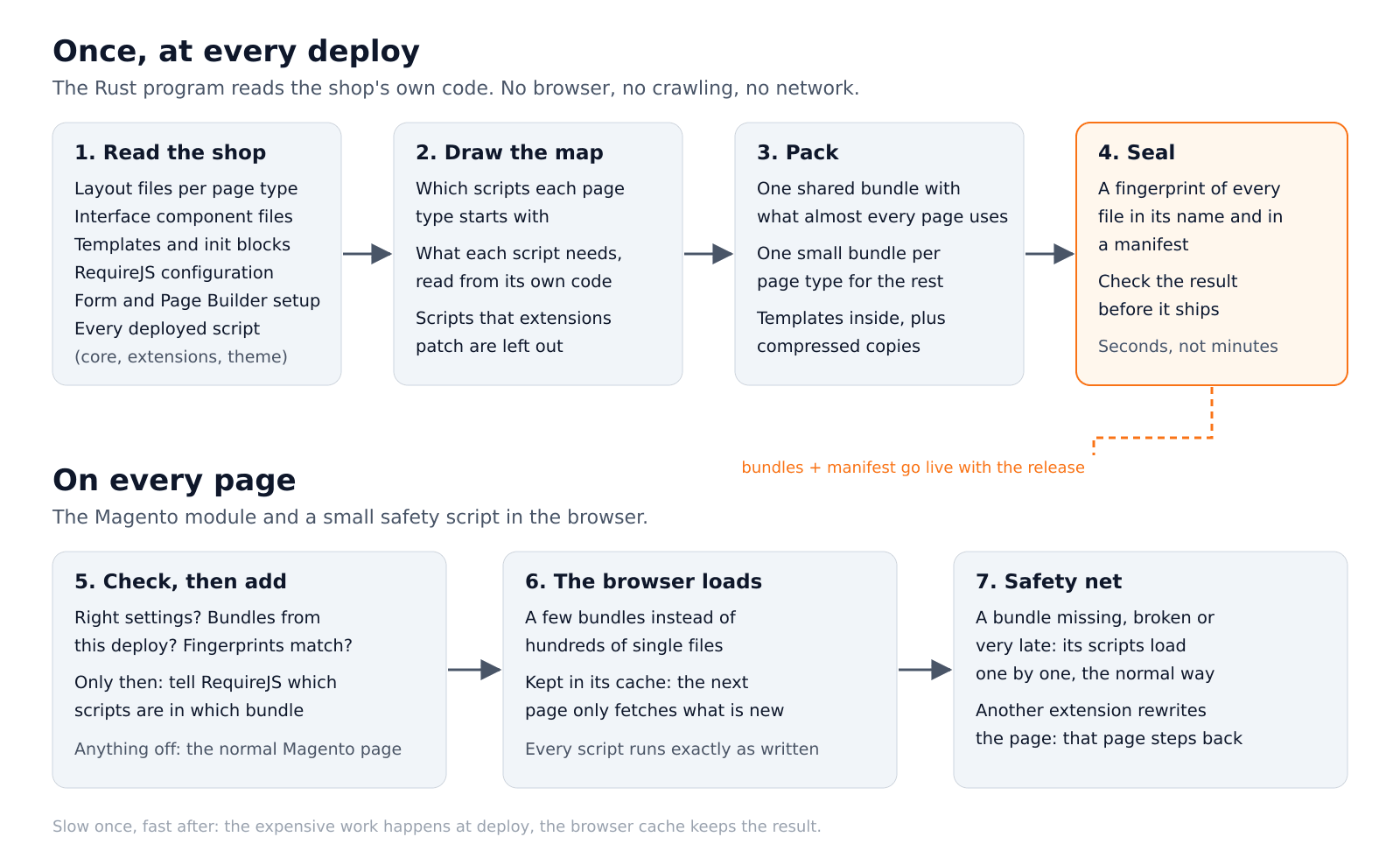
The program runs once, during the normal deploy, right after Magento has prepared the theme files. It never opens a page and never talks to the network. It reads the same files Magento reads, and asks two questions of them: what does each page type start with, and what does each of those scripts need in turn?
| Read from | Tells it | |
|---|---|---|
| Layout files | Every module and the theme, merged the way Magento merges them | Which blocks appear on each page type |
| Interface components | The XML that describes grids, forms and their parts | Which scripts each grid or form starts |
| Templates | The init blocks inside them | Which scripts a block starts on its own |
| RequireJS configuration | Every module's config, merged like Magento does | Where each script lives, and which ones extensions patch |
| Forms and Page Builder | The setup that adds fields and content types | The extra scripts those screens need |
| The scripts themselves | Every deployed script, parsed, not run | What each script needs in turn |
From that it draws one map: every page type, and the full chain of scripts behind it. The scripts almost every page needs go into one shared bundle. Each page type gets a small bundle with the rest. Anything an extension patches is left out, so the patch still applies. Every file gets a fingerprint of its contents in its name and in a manifest, and the result is checked before the release goes live. Parsing thousands of scripts is the kind of work Rust is good at: on a large shop the whole step takes seconds.
The loop
Every idea went through the same loop, and the loop is the real method here.
- Write the bar down before building anything. 100 milliseconds, or 300, or a first paint that may not get later. If an idea misses it, it stops, however clever it is.
- Build the smallest thing that could prove it. The very first bundles were not a module at all. The test browser simply injected them into the real admin. Five of six heavy screens got 13 to 27 percent faster. Only then did we design anything.
- Let a stranger review it. Each design went to a fresh agent that had seen none of the work, with one instruction: approve or reject, and say why. It rejected a lot, and every rejection made the result simpler.
- Measure on the real thing, then decide. Not in a lab, on real shops, with and without, in the same hour.
Because an idea could go from guess to measured number in an hour or two, killing one cost almost nothing. So most of them died.
The ideas that sounded brilliant
Some of the most interesting ideas came from asking how other parts of the stack solve the same problem. Each one sounded like it should work. Most of them taught us something instead.
| Borrowed from | What happened | |
|---|---|---|
| Learn from real use | Compilers (profile-guided optimisation) | Exact records, no gain: the browser cache already covered it. Removed |
| Do not rebuild on every click | Caching | No two forms were ever the same. Dropped |
| Serve a ready page | Varnish | Not shareable in the admin, but preparing the next page before the click stayed |
| Keep computed results | Redis | The browser already does it; idle prefetch and one copy per file stayed |
| Build only what you see | Alpine.js | Page Builder on view stayed; hidden sections later lost fields |
Learn from real use, like a compiler. Modern compilers watch how a program actually runs and use that to build it better next time. We tried the same for bundles: every admin page reported which code it really used, and the next deploy built the bundles from that. The records were exact. They showed that between a quarter and almost half of the code in a bundle never ran when the page opened. And yet moving it out saved nothing. That code was downloaded once and then sat in the browser's cache, costing milliseconds. Slow once, fast after, again: the browser had already solved the problem we were trying to solve. We removed it all.
Do not rebuild it on every click. Why build the same heavy product form again and again? Cache it, reuse it. We tried. No two product forms were ever the same, not even the same product for the same person twice. We tried letting the page adopt HTML built ahead of time: it looked ready sooner, but it did not work any sooner. We tried an admin that never reloads at all. It was faster, and it slowly filled up with copies of the same form.
Varnish, but for the admin. Varnish makes the storefront fast in the same slow-once, fast-after way: the first visitor waits, everyone after gets a ready page. Could the admin work like that? Not with a shared cache, and for good reasons: every admin page belongs to one person, one session and one record, and Magento deliberately forbids storing it. But the principle still applied, just closer to the user. If we cannot keep the page, we can prepare the next one. Modern browsers can quietly build the page you are about to open, just before you click. That idea survived: pressing Back on a product form now shows the list almost at once.
Redis, but for JavaScript. Keep computed results around so the next page does not have to compute them again. It turned out the browser already does most of this for us. What stayed was the delivery side: fetching the next release's files while the browser is idle, and storing identical files only once.
Work like Alpine.js. The newer frameworks are fast because they do less at the start and only build what you can see. We tried teaching Knockout the same habit. Page Builder now waits until you scroll to it, which saves a noticeable moment on every product form. But building hidden form sections later mostly moved the work around, and it lost fields when someone saved early. Knockout simply was not designed to work that way.
When I said it was not good enough
The agents were very good at the loop. They were not good at thinking big on their own. After many rounds of careful tuning, the gains were real but small, and at some point I said so plainly: this is not revolutionary. Stop tuning the pieces and question the process.
That changed the questions. Not how do we build this page faster, but why does the browser build an identical page from scratch on every click at all? Preparing the next page before the click came out of that conversation. So did the decision to stop working on script loading once two ideas in a row landed inside the noise. The AI made the loop fast. Deciding what the loop was for stayed a human job.
Swapping the old libraries
One more big idea deserves its own place. If RequireJS, Knockout and jQuery are old, why not swap them for modern versions with the same API, so every extension still works? We went through them one by one. Only one real hot spot showed up, in the way Magento fills in its templates, and fixing it saved a noticeable chunk on every heavy screen without replacing anything. Everything else, from a faster RequireJS to a native time-zone library, added up to a few dozen milliseconds.
The lesson was not that the old libraries are fine. It was that their size is not where the time goes. They sit in the cache and start in milliseconds. And every library you swap runs under code you have never read, in every extension and every custom theme. A tiny difference shows up months later as a checkout that fails. For a few milliseconds, that is not a trade worth making.
We also went through what modern browsers now offer for free, and what Magento could stop carrying. The back/forward cache, which returns you to the previous page instantly, works on parts of the storefront but never in the admin: Magento marks admin pages as never to be stored, and for security that is the right call. Speculation rules, which let the browser build the next page before you click, became one of the best results in the admin, and did nothing useful on the storefront, where a hover is too short to finish in time. Prefetching stayed where it costs nothing, fetching the next release's bundles while the browser is idle, and went where it delayed the first paint. Lazy loading stayed for Page Builder, which now waits until you scroll to it, and went for hidden form sections, which lost fields. Slimming the libraries and dropping deprecated ones looked like the obvious clean-up: Prototype still ships in the admin, there is an old time-zone file of 737 KB, a polyfill of 105 KB that is deployed but never loaded. Measured, most of it cost milliseconds, because the browser caches it once and then barely notices it. The clean-up is worth doing for its own sake one day. It is not where the speed is.
What we left out
A list of what survived only tells half the story. This is the other half: the ideas we measured and dropped, and the ones we chose not to try at all.
| What we measured | Why it went | |
|---|---|---|
| Learn bundles from real use | Exact records; a quarter to half of bundled code never ran at start | Moving it out saved nothing: it was already cached |
| Cache the product form between loads | No two forms were ever the same | Nothing could be reused |
| Adopt prebuilt HTML | Looked ready up to 1.2 s sooner, worked only 30 to 65 ms sooner | Redrawing over it caused script errors |
| An admin that never reloads | 16 to 28 percent faster | Memory grew and forms doubled |
| Build hidden form sections later | 44 to 158 ms | Mostly moved work; an early save lost fields |
| The same, safe on every save | No field lost; 25 to 46 ms | Inside the noise; the work only moved |
| Cache the field description per product type | 0 of 49 product pairs identical | It depends on websites, store values and language |
| Precompiled Knockout bindings | 10 to 20 ms | Knockout already caches them |
| A faster RequireJS scheduler | Page errors on every load | Broke the page |
| Native time-zone library | 5 to 10 ms | Far below the bar |
| Preload every module up front | Product edit got slower | Slower |
| More libraries in the shared bundle | Bundle 50 percent larger | Pages on a slow line got later |
| Prepare the next storefront page on hover | Needs about 3 s in the background | A normal hover made it later |
| A greyed form skeleton | Removed too early | No change in speed or layout jump |
| Why not | What would change that | |
|---|---|---|
| A same-API rewrite of Prototype | Changes built-in browser objects, hundreds of call sites in core | A measured hot spot inside it |
| Slim versions of moment, cookies and storage | Estimated 1 to 17 ms each, a risk for every extension | One combined test that clears 100 ms |
| A faster RequireJS address table | Estimated under 0.2 s, sensitive to timing | A safe design for the timing |
| Delaying or blocking other sites' scripts | Not ours to change | Nothing: left alone by design |
| One stylesheet per page type | A separate project from scripts | The next step for the storefront |
| Pictures, image formats, HTTP/2 | Server and content work, not a module | Not part of this |
| A new admin UI | That is a rebuild, and it breaks extensions | Nebula is doing it |
What Magento got right
Here is what I did not expect to write. After 58 rounds inside it, I think Magento's frontend engineering is better than its reputation.
RequireJS gave Magento on-demand modules years before browsers had their own. Knockout gave it declarative data binding before React and Vue were everywhere. Building screens in the browser from a description the server sends is exactly the idea modern frameworks are built on today. The people who designed this were not wrong. They were early.
What makes it slow is how those ideas are delivered: hundreds of small files discovered one by one, a description of the screen that can be a megabyte on its own, and every part created at the start whether you can see it or not. That is what we fixed, with the same principle Magento applies everywhere else: work it out once at deploy, serve it ready. Not new ideas, the old ones finished.
Magento was ahead of its time
To understand what we were working with, we also looked the other way: at the frameworks people call modern today. Alpine.js, signals in Solid, Preact and Angular, React and its server components, TanStack Query, native modules with import maps. Almost every idea in them was already in Magento in 2015, under a different name.
| Modern name | Magento's version | |
|---|---|---|
| Fine-grained reactivity | Signals (Solid, Preact, Angular) | Knockout observables: a value changes, only what depends on it updates. Knockout did this in 2010 |
| Behaviour declared in the HTML | Alpine.js x-data and x-init | data-mage-init and x-magento-init: a block says in its own HTML which script to start, with which settings |
| The server describes, the browser builds | React server components, server-driven UI | UI components: the server sends a description of the grid or form, the browser builds it |
| Data fetched and cached apart from the page | TanStack Query | Grid data providers: the rows arrive in their own request, the page shell first |
| Modules loaded on demand | ES modules and import maps | RequireJS and its configuration of paths and maps |
| Patching another package's code safely | Module patching, plugins | RequireJS mixins: an extension changes a script without editing it |
| Load only what this route needs | Route-based code splitting (Vite, Next.js) | Never finished. This is the part Rustpack builds |
So why is it still slow, if the ideas were right so early? Because Magento put all of them in the browser, at run time, on every page. The modern frameworks moved the same work to a build step. Magento never had one for its scripts: its deploy is PHP, and the browser was left to work everything out each time.
- Finding the code at run time. RequireJS discovers what a page needs while the page loads, one file after another. Modern tools work that out once, at build time.
- Compiling in the browser. Knockout reads its bindings and templates as text and turns them into code on the page. Svelte and Solid compile them ahead of time.
- Building everything at once. Every grid column and every form field in a closed section is created at start. Modern frameworks build what you can see.
- Sending the whole description. A product form's description can be a megabyte, built by the server on every page. Modern apps send data, not the screen's blueprint.
- Flexibility first. Every extension can hook into any script at run time. That is Magento's strength, and it is also why so little could be decided ahead of time.
None of that was a mistake in 2015. The browser tools to do better did not exist yet. But the price is paid on every admin click, by everyone who works in it.
Seen like that, Magento's frontend is not old-fashioned. It is early. The same ideas, made fast by later tools that had a compiler and a build step from the start. Magento had the ideas and no build step for its scripts. That is exactly the gap we filled: the code splitting every modern framework does at build time, done for Magento at deploy time, without changing a single idea underneath.
The ceiling, and the next leap
I believe this is about as far as script loading can go while Magento's frontend stays what it is. Every script still runs exactly as its author wrote it, every extension still works, and the pages are noticeably faster. That is not the same as saying the admin is done. On a heavy product form, Knockout building the screen and the server building the page are still about half of the wait. While writing this, we tested the two most promising ideas for that half. Building hidden form sections only when they are opened, this time safely: every save button waited until the last section existed, and not a single field was lost. It gained 25 to 46 milliseconds, less than the difference between two identical runs, and the work simply moved to later. And caching the part of the form that describes the fields, which we expected to be the same for every product of the same type. It was not, for a single pair out of 49: it changes with the product's websites, its store-view values and the admin's language. Two more ideas measured and dropped. Beyond this, going further really does mean replacing the ideas themselves.
That leap has been made once already. Hyva rebuilt the Luma storefront on Alpine.js and Tailwind, and it is much faster for it, at the cost of a new theme and compatible extensions. For the admin, the same leap is being made by Nebula, a free admin theme from qoliber and Siteation that, by its own description, replaces RequireJS and Knockout with native modules and Alpine.js. Built on a completely different foundation, it should be faster than anything that keeps the old one, ours included. I have not measured it, so read that as an expectation from how it is built.
So the choice is simple. If you can rebuild, rebuild. If you cannot, because your shop depends on extensions that add admin screens the old way, or a rebuild is not on this year's plan, this is how far the existing stack can be pushed without touching anybody's code.
Why JavaScript first, and what comes next
We started with JavaScript for one reason: it is where the waiting is. On the heaviest admin screen the server was done in under a second, and the page became usable more than a second and a half later. The time you feel when you click is the browser's time. So that is where the first project went.
Two other topics came up again and again on the way, and each deserves its own story rather than a footnote here.
Retiring the old libraries. The admin still ships Prototype, a library from before jQuery was common, next to jQuery UI, an old date library with a time-zone file of 737 KB, and polyfills for browsers nobody uses any more. We measured them for speed and they cost milliseconds, because the browser caches them once. But speed is not the only reason to retire code. Old libraries carry old security issues, they hold back modern browser features, and every extension that still leans on them makes the next upgrade harder. Retiring them is a careful, library-by-library job with its own tests, and we will write it up separately.
FrankenPHP. That is the server side of the same question. Instead of starting Magento from scratch for every request, a worker keeps it loaded and serves request after request. We have run it on real shops. In our tests it was faster for a single user, but under load it used about a third more CPU per request, and keeping Magento's state clean between requests is still the hard part. It is promising, it is not ready for every shop yet, and it is a different story from this one.
Where it works
| Works? | Notes | |
|---|---|---|
| Luma-based storefront | Yes | Every page type gets its own bundle |
| Hyva storefront | Left alone | No RequireJS there; it detects that by itself |
| Admin | Yes | Where it gains most: heavy screens with many extensions |
| Production mode | Yes | The only mode it runs in |
| Developer and default mode | No | It switches itself off; developers see plain Magento |
| Magento's own bundling or merging on | No | It steps aside instead of fighting them |
| Full-page cache and Varnish | Yes | Cached pages keep their bundles until the cache is cleaned |
| Magento 2.4 and Mage-OS | Yes | Tested on Mage-OS 3.6 and 4.0 |
| Intel/AMD and ARM servers | Intel/AMD tested | The ARM build is included but not yet run on a real server |
What it did in the end
Heavy admin with many extensions. Warm admin screens became 18 to 28 percent faster; storefront pages were usable 1.3 to 3.7 seconds sooner on desktop.
Same shop, same output byte for byte. Faster lookups, work in parallel, and only the themes and languages the shop uses.
The deploy step that builds all of this went from three minutes to about twelve seconds, producing exactly the same files. I did not race it against MagePack on the same shop, so there is no claim here that it beats it.
Is it ready for production?
Overall confidence: 7 out of 10. The admin scores 8, the storefront 6. The gap is one open case on the cart page, below. Each risk we know of is scored on its own: 10 means safe, 0 means not safe.
| Score | Why | |
|---|---|---|
| Switching it off | 10 | One setting and a cache clean, no deploy. Pages load the normal way on the next visit |
| A bundle fails or never arrives | 9 | The safety script loads the normal files instead |
| Extensions that change scripts through mixins | 9 | Those scripts are never put in a bundle, so the change keeps working |
| An extension changes the page after the bundles were planned | 8 | It notices, steps back on that page type and loads it the normal way until the next deploy |
| Deploys that prepare static files with another tool | 8 | One extra build command after that step; without it, pages simply load the normal way |
| Older servers (glibc below 2.34) or Alpine images | 8 | Nothing is built, pages load the normal way |
| Admin product edit when the shared bundle is very late | 7 | Only if it is more than 30 seconds late can the page show script errors |
| Checkout on a slow phone | 7 | The layout moves a little more while it loads than without the module |
| Cart page on a slow phone | 5 | In 1 of 5 test loads a script error left the page unusable. Still open |
How I would take it to production: the admin first, because only staff see it and that is where it gains most. The storefront a week or two later, one store view at a time, once the cart case is closed. Removing the module itself is a normal module removal: commit it and deploy, never just delete the folder on a live shop.
What to check in the admin
bin/magento rustpack:statussays it is working for every theme and language you use.- Product edit: open, change a field, save. Do it for each product type you sell, and for one with Page Builder content.
- Product, order and customer grids: filter, sort, page, change columns, run a mass action, export.
- Order view and the order create screen, a CMS page and block with Page Builder.
- Every screen your extensions add: their grids, forms and configuration pages.
- Back from a form to its list, and the browser console stays clean throughout.
What to check on the storefront
- Home, a category with filters, sorting and paging, and search results.
- Product page: gallery, options and swatches, add to cart, the mini cart.
- Cart: change a quantity, remove an item, apply a discount code.
- Checkout up to the payment step: addresses, shipping methods, payment methods (no need to place an order).
- Log in, the account pages, the wishlist.
- Every store view and language, on a phone and on a desktop, with the console clean. Then switch the module off and confirm the same pages behave the same.
Try it, and let your AI read it first
Do not take my word for any of this. The way we built it is the way you can check it.
- Measure before and after on a staging copy, the pages you care about, the same number of loads in the same hour.
- Check the fingerprints. Every bundle file carries a fingerprint of its contents in its name. Deploy twice without changing any code and the names must be identical.
- Check that nothing changed in behaviour. With and without the module, the same mixins must run and the console must stay clean.
- Ask your AI. Give the code to the assistant you already use and ask what it does to your pages, whether your extensions' mixins survive, and whether it fits your deploy. That is how it was built: an agent reading the code and a human deciding.
The module is not public yet. If you want to try it on a staging copy, get in touch, and tell us what you find, especially where it steps back.
For the server side of Magento speed, which this story leaves out, see my performance guide.
A founder, an engineer at heart, an independent consultant who seek alternatives to the mainstream — Currently focused in burning AI tokens to deliver the best agentic eCommerce experience.
More Articles
More Articles

I deleted the manual pull request, and review now happens with the agent, not after it. The five repositories saw 1,188 commits last month, and our own services stayed up 99.95%.

Helio is the small agent on every server StoreFrame runs. It watches the server, the containers and the store, reports live, keeps your history on your own server, and takes work back. Now in Rust.

Mago is the open-source admin assistant shipping with Mage-OS 4. Who builds it, why it beats the first attempt, the MCP addon I built at the Zwolle hackathon, and what it really costs.

So you know the person behind it. Not a sales pitch, just what StoreFrame is to me: a home for my team, my notes as working code, and the impossible thing I'm glad I tried to build.

A PHP vulnerability dropped the night before Meet Magento Germany. Ten things I took home: about people, patching, merchants who choose offline, and why badges don't stop bugs.

PWA Studio, Vue Storefront, GraphCommerce, Rapidez, Breeze and Hyva: why headless Magento kept losing to cost, and why AI that writes JavaScript fluently may finally flip the verdict.