
Per-environment settings
All per-environment configuration panels — SSH keys, domains, resize, backup, utilities, and more.
The Settings tab collects every configuration panel for an individual environment onto a single scrolling page. Each panel is a card; scroll down to reach less-frequently-used controls. Changes made here affect only this environment.
Panels
| Panel | What it does |
|---|---|
| New environment | Create a child environment (staging, develop, test) cloned from this one |
| SSH keys | Add or remove SSH public keys that grant server access |
| Custom domains | Map additional domains to your store, one per Magento store view |
| Resize server | Upgrade to a larger server type |
| Backup & recovery | Review automated backup status and manage recovery options |
| Utilities | Platform controls — PHP runtime, Varnish, search engine, and more |
| Active jobs | Inspect a running background job; clear a stuck lock if needed |
| Pricing | Read-only display of this environment's current billing status: monthly cost, slot type, and trial badge if applicable. For billing concepts see /docs/billing. |
| Destroy | Permanently delete this environment and all its data — irreversible |
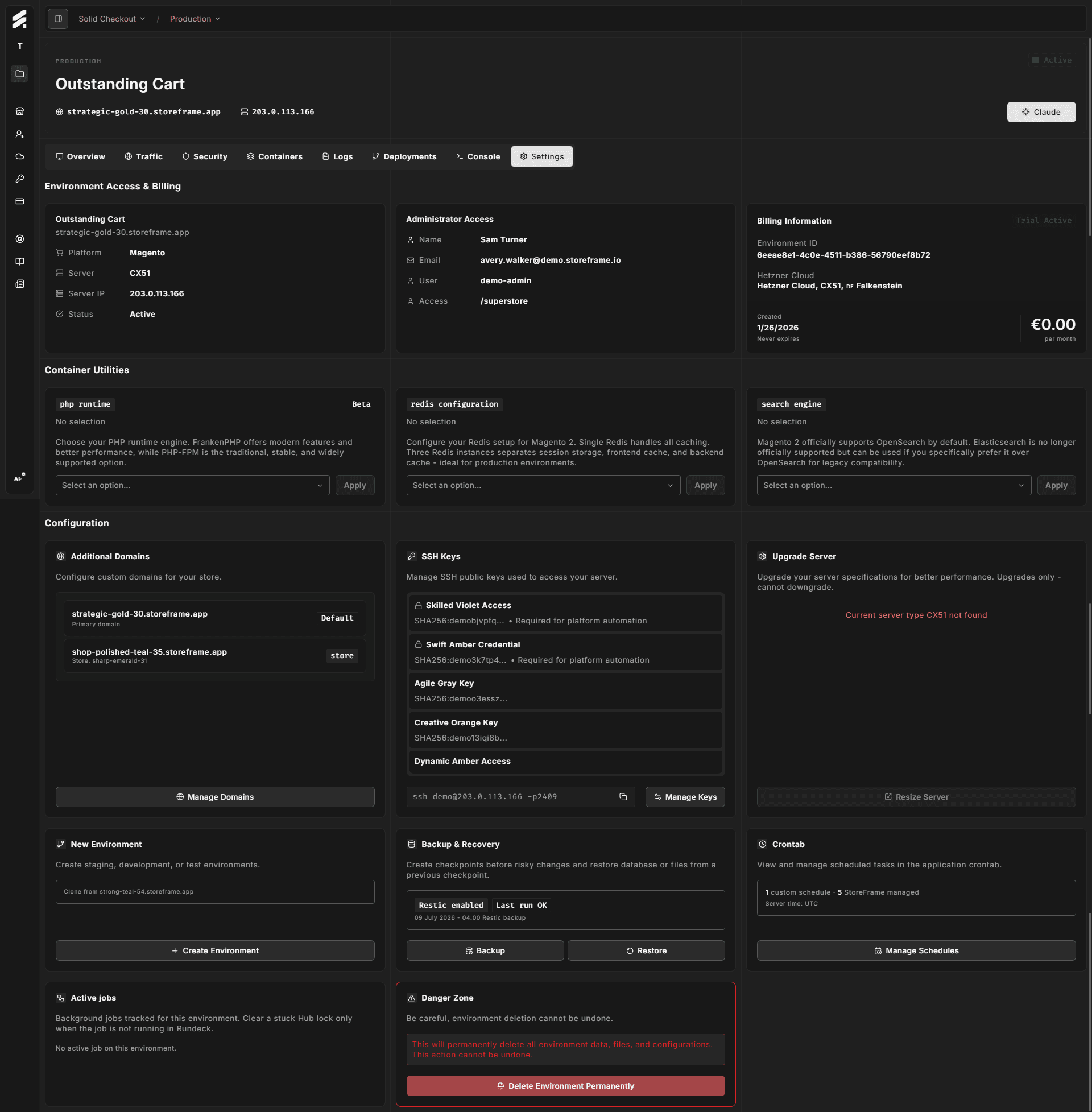
The Destroy panel is marked with a red danger border to make it visually distinct. It is always the last card on the page. All other panels are safe to open; no change is committed until you click a button.