
Destroy environment
Permanently delete an environment, its server, all data, and its billing slot — this cannot be undone.
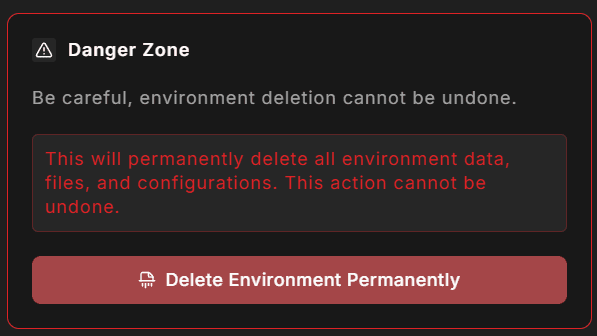
The Destroy panel is the last card on the Settings tab, bordered in red. It initiates permanent deletion of the environment: the server is torn down, all data is erased, and the billing slot is released from your subscription.
This action cannot be undone.
What is deleted
When you destroy an environment, StoreFrame removes:
- All environment files and the Magento media library
- The MariaDB database and all its contents
- Server infrastructure and platform-managed configuration
- All backups and snapshots
- SSL certificates and domain configurations
- SSH keys and access credentials
- Deployment history and provision logs
The billing slot is removed from your Stripe subscription before infrastructure teardown begins, so you are not charged for the environment after destruction is confirmed.
Confirmation dialog
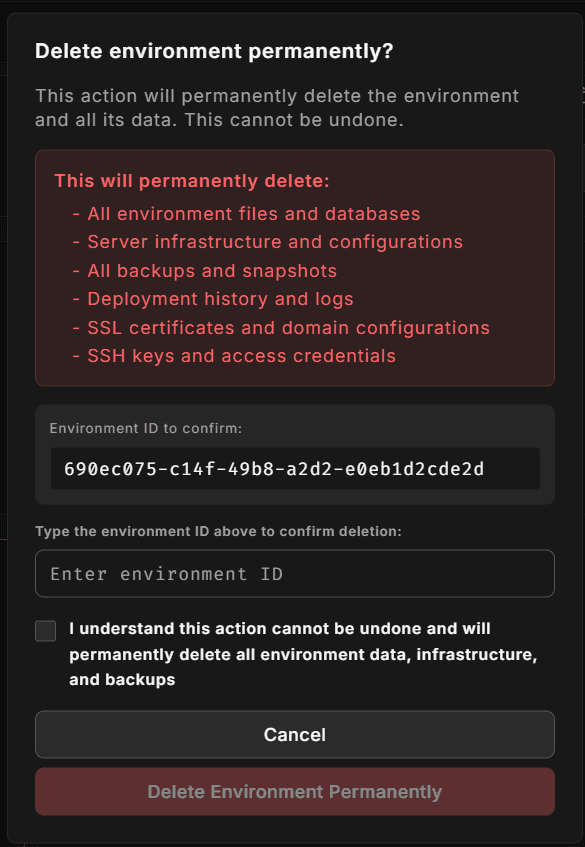
Clicking Delete Environment Permanently opens a confirmation dialog. To proceed you must:
- Type the environment ID — the UUID shown in the dialog (for example,
env_01j2k...). The input field uses a monospace font to make the ID easy to read and match. - Check the acknowledgement box — "I understand this action cannot be undone and will permanently delete all environment data, infrastructure, and backups."
The final Delete Environment Permanently button stays disabled until both conditions are met.
What happens after you confirm
- The billing slot is removed from your Stripe subscription (trial environments skip this step).
- A destroy job is created and the Hub navigates you to the provisioning progress screen.
- The platform tears down the server infrastructure.
- The environment record is marked as destroyed in Hub.
Bare metal environments
If the environment runs on bare metal hardware, the Destroy button is disabled and a notice explains that removal must be handled manually. Contact support to remove a metal environment from the dashboard.
Recovering after accidental destruction
There is no self-service recovery. If you destroy an environment by mistake, contact support immediately — restoration from a backup snapshot may be possible depending on retention, but is not guaranteed.
Before destroying a production environment, consider taking a manual backup from the Backup & Recovery panel.